Adapter 패턴
호환되지 않는 인터페이스를 가진 객체들을 연결할 수 있게 해주는 패턴
한 객체의 인터페이스를 클라이언트가 기대하는 인터페이스로 변환해주는 역할해준다.
즉 인터페이스가 맞지 않는 객체들을 연결해주는 중간 변환기
ex)
| 🧩 기존 시스템과 새 시스템의 인터페이스가 다를 때 | 예: 레거시 시스템 ↔ 최신 모듈 |
| 🔄 외부 라이브러리와 내 코드가 안 맞을 때 | 인터페이스 이름, 메서드 시그니처가 다를 때 |
| ♻️ 기존 코드를 바꾸지 않고 재사용하고 싶을 때 | 인터페이스만 바꾸고 내부는 그대로 둠 |
상속을 사용하는 방법과 위임을 사용하는 방법이렇게 2개가 있다.
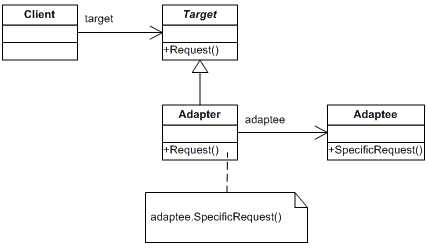
//클라이언트가 기대하는 인터페이스 (Target)
interface MediaPlayer {
    void play(String fileName);
}
//기존 시스템 (Adaptee)
class VLCPlayer {
public void playVLC(String fileName) {
System.out.println("🔊 VLC 재생: " + fileName);
}
}//어댑터 클래스
class VLCAdapter implements MediaPlayer {
private VLCPlayer vlcPlayer = new VLCPlayer();
public void play(String fileName) {
vlcPlayer.playVLC(fileName); // 변환/중계
}
}public class Main {
public static void main(String[] args) {
MediaPlayer player = new VLCAdapter();
player.play("movie.vlc");
}
}
Bridge 패턴
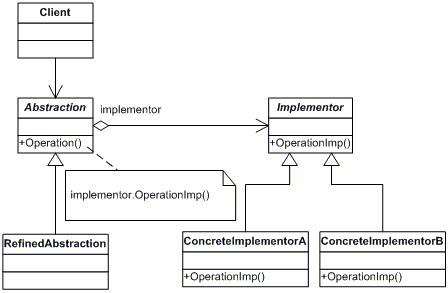
추상화와 구현을 분리!
둘을 독립적으로 확장할 수 있게 하는 디자인 패턴
ex)
| 📦 추상화와 구현이 별도로 자주 바뀔 때 | 둘을 독립적으로 바꿀 수 있어야 함 |
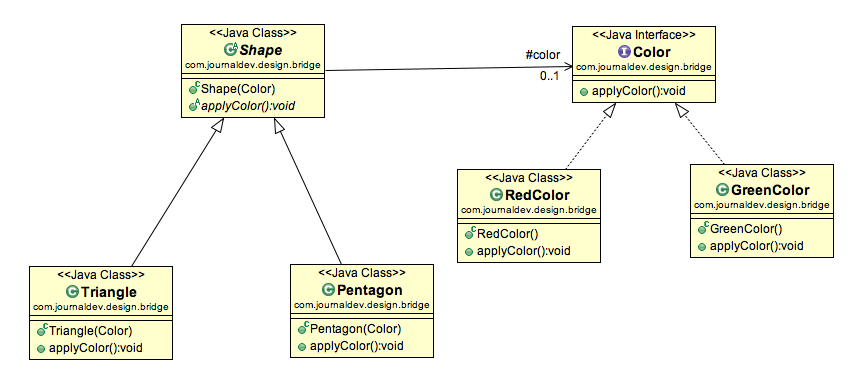
| 🧩 클래스 계층이 조합 폭발을 일으킬 때 | ex: Circle, Rectangle × Red, Blue |
| 🔌 기능과 플랫폼을 분리하고 싶을 때 | 예: UI 컴포넌트 + OS 별 구현 분리 |
//구현부 인터페이스 (Implementor) & 구현부 구체 클래스 (ConcreteImplementor)
interface Color {
    String fill();
}

class RedColor implements Color {
    public String fill() {
        return "빨간색";
    }
}

class BlueColor implements Color {
    public String fill() {
        return "파란색";
    }
}
//추상화 인터페이스 (Abstraction) & 확장된 추상화 (Refined Abstraction)
abstract class Shape {
protected Color color;
public Shape(Color color) {
this.color = color;
}
public abstract void draw();
}
class Circle extends Shape {
public Circle(Color color) {
super(color);
}
public void draw() {
System.out.println(color.fill() + " 원을 그립니다.");
}
}
class Square extends Shape {
public Square(Color color) {
super(color);
}
public void draw() {
System.out.println(color.fill() + " 사각형을 그립니다.");
}
}public class Main {
public static void main(String[] args) {
Shape redCircle = new Circle(new RedColor());
redCircle.draw(); // 빨간색 원을 그립니다.
Shape blueSquare = new Square(new BlueColor());
blueSquare.draw(); // 파란색 사각형을 그립니다.
}
}
Composite 패턴
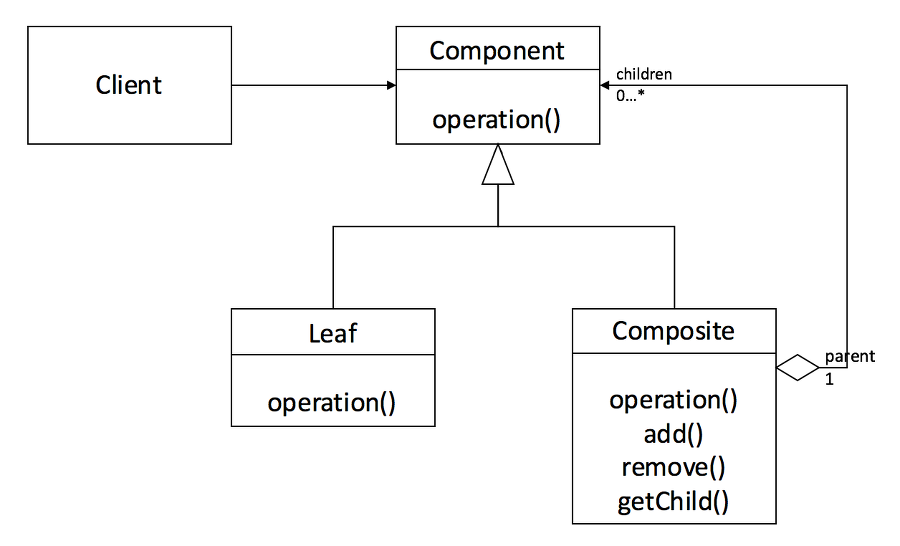
객체들을 트리 구조로 구성하고, 단일 객체와 복합 객체를 동일하게 다룰 수 있게 해주는 패턴
그릇과 내용물을 동일시하는 재귀적인 구조. 즉 복수와 단수를 동일시한다.
트리 구조로 표현되는 대상을 표현하여 단말 노드와 집합 노드를 동일하게 취급하고 싶을 때
public abstract class Entry {
   public abstract String getName();
   public abstract int getSize();

   public void printList() {
   	printList("");
   }

   protected abstract void printList(String prefix);

   @Override
   public String toString() {
   	return getName() + " (" + getSize() + ")";
   }
}
public class File extends Entry{
private String name;
private int size;
public File(String name, int size) {
this.name = name;
this.size = size;
}
@Override
public String getName() {
return name;
}
@Override
public int getSize(){
return size;
}
@Override
protected void printList(String prefix) {
System.out.println(prefix + "/" + this);
}
}
public class Directory extends Entry{
	private Stirng name;
	private List<Entry> directory = new ArrayList<>();  //중요!

	public Directory(String name){
    	this.name = name;
   	}

	@Override
	public String getName() {
		return name;
	}

	@Override
	public int getSize() {
		int size=0;
		for(Entry entry: directory) {
			size+=entry.getSize(); //중요!
		}
		return size;
	}

	@Override
	public void printList(String prefix) {
		System.out.println(prefix + "/" + this);
		for(Entry entry: directory) {
			entry.printList(prefix + "/"+ name);
		}
	}

	//중요! 디렉터리 엔트리를 디렉터리에 추가한다.
	public Entry add(Entry entry) {
		directory.add(entry);
		return this;
	}
}
public class Main {
public static void main(String[] args) {
System.out.println("Making root entries...");
Directory rootdir = new Directory("root");
Directory bindir = new Directory("bin");
Directory tmpdir = new Directory("tmp");
Directory usrdir = new Directory("usr");
rootdir.add(bindir);
rootdir.add(tmpdir);
rootdir.add(usrdir);
bindir.add(new File("vi",10000));
bindir.add(new File("latex", 20000));
rootdir.printList();
System.out.println();
System.out.println("Making user entries...");
Directory youngjin = new Directory("youngjin");
Directory gildong = new Directory("gildong");
..
}
}
Proxy 패턴
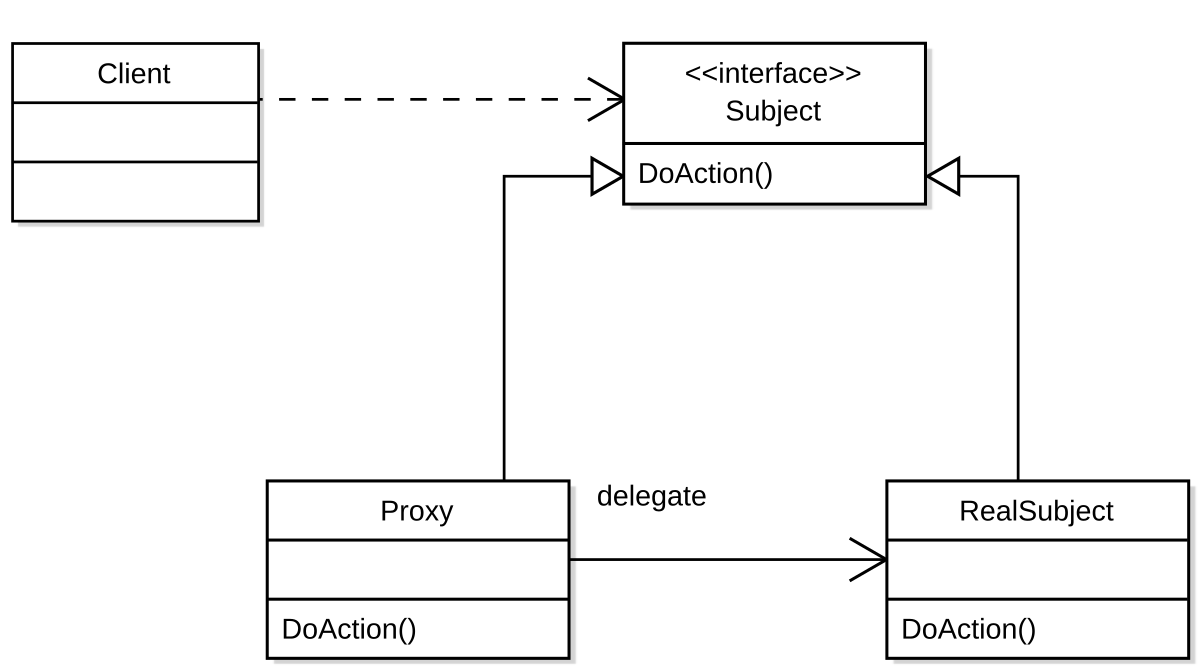
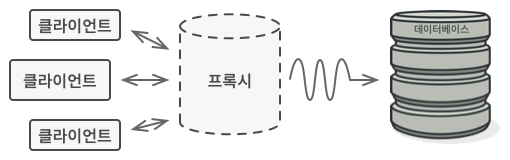
실제 객체 대신 요청을 받아서 처리하거나, 제어하는 중간 대리자 역할
실제 객체에 직접 접근하지 않고, 그앞에 대리 객체를 두어 접근을 제어하거나 부가 기능을 추가할 수 있게 해주는 패턴
즉 진짜 객체 대신 요청을 가짜 객체
ex)
- Spring AOP (프록시 기반으로 동작)
- Hibernate Lazy Loading
- Java RMI, gRPC Stub
- Spring Security 권한 검증
- 캐시 프록시 / API 게이트웨이 등
| 🐢 객체 생성 비용이 클 때 | 실제 객체를 늦게 생성 (Lazy loading) |
| 🔐 접근을 제한해야 할 때 | 권한 체크, 인증 등 |
| 🧾 기록이나 로깅이 필요할 때 | 요청 이력을 로그로 남김 |
| 📡 네트워크를 통해 요청 중계할 때 | RPC, 원격 프록시(Remote Proxy) |
가상 프록시
가장 기본은 대리자 역할이다. 즉 인터페이스를 공유하며
실제 객체를 사용하기 전까지 대리인에게 일을 맡기는 패턴이다.(객체가 필요할 때까지 생성을 미룸)
또 확장 될 수 있는데
스마트 프록시
객체에 대한 접근시마다 부가적인 기능을 수행(로그, 참조 횟수 증가등)
스마트 포인터처럼, 실제 객체에 접근을 감싸면서 기능을 덧붙인다.
보호 프록시
클라이언트가 직접 객체에 접근하지 못하고 프록시가 접근 권한을 검사한다.
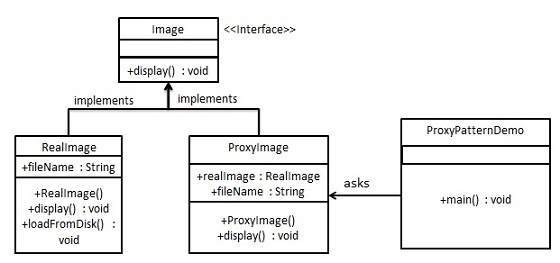
아래는 가상 프록시 예
//공통 인터페이스
interface Image {
    void display();
}
//실제 객체 (RealSubject)
class RealImage implements Image {
private String filename;
public RealImage(String filename) {
this.filename = filename;
loadFromDisk(); // 비용이 큰 작업이라고 가정
}
private void loadFromDisk() {
System.out.println("이미지 로딩 중: " + filename);
}
public void display() {
System.out.println("이미지 표시: " + filename);
}
}//프록시 객체
class ProxyImage implements Image {
private RealImage realImage;
private String filename;
public ProxyImage(String filename) {
this.filename = filename;
}
public void display() {
if (realImage == null) {
realImage = new RealImage(filename); // 실제 객체 생성 지연
}
realImage.display();
}
}public class Main {
public static void main(String[] args) {
Image img = new ProxyImage("big_photo.jpg");
System.out.println("1차 접근");
img.display(); // 이미지 로딩 + 표시
System.out.println("2차 접근");
img.display(); // 로딩 없이 바로 표시
}
}
Decorator 패턴
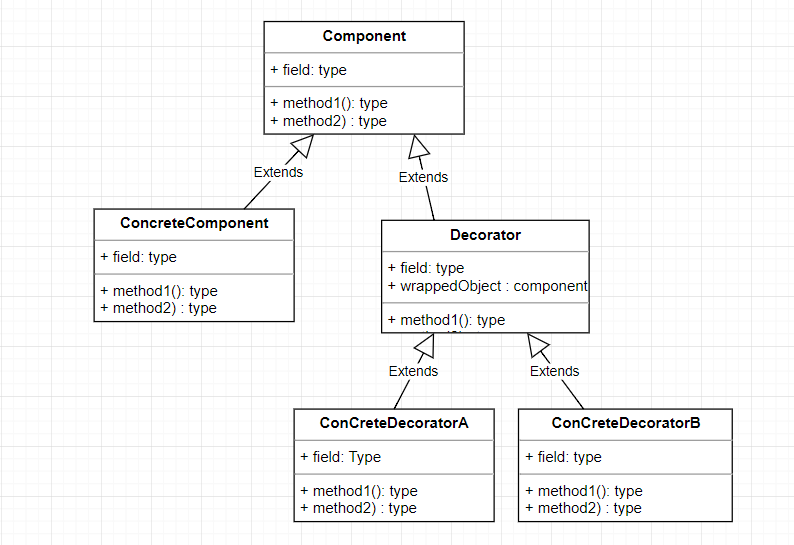
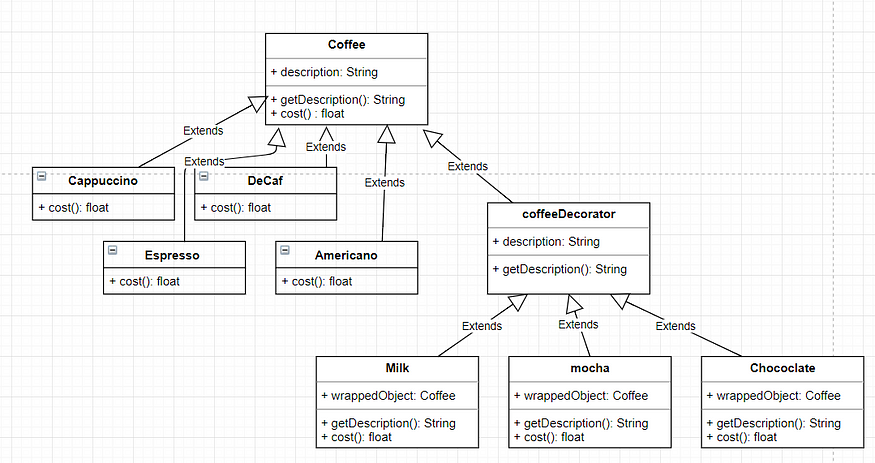
기존 객체를 감싸서, 동적으로 기능을 추가할 수 있게 하는 패턴
기존 객체를 감싸는 래퍼(wrapper) 객체를 사용해서
기능을 덧붙이거나 변경할 수 있도록 해준다.
https://ittrue.tistory.com/558
ex)
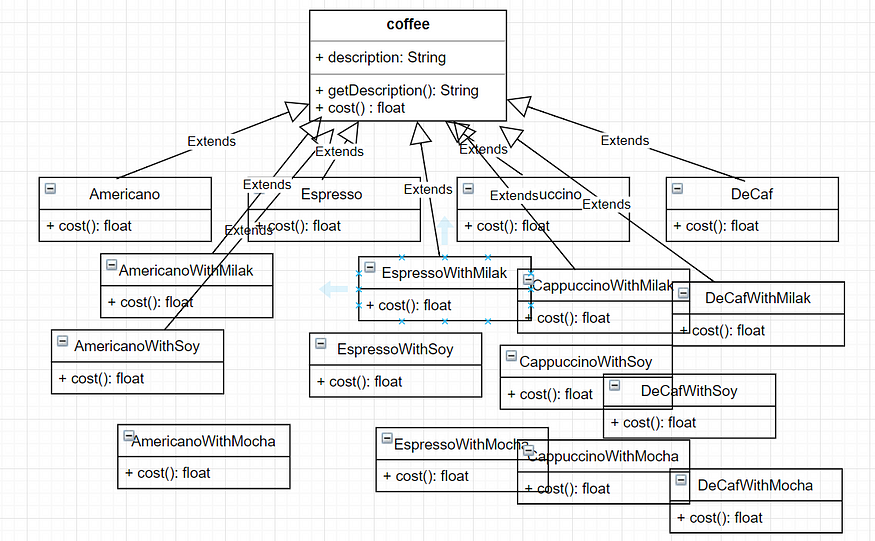
| ✅ 상속으로 기능 추가하기 어려울 때 | 상속은 조합이 어렵고 개수 폭발 가능 |
| ✅ 런타임에 유연하게 기능을 추가하고 싶을 때 | 예: 로그 추가, 캐시 적용 등 |
| ✅ 중복 없이 다양한 조합을 만들고 싶을 때 | 기능을 조합해서 구조적으로 깔끔하게 처리 가능 |
interface Coffee {
    String getDescription();
    int getCost();
}

class BasicCoffee implements Coffee {
    public String getDescription() {
        return "기본 커피";
    }

    public int getCost() {
        return 2000;
    }
}
//데코레이터 (추상)
abstract class CoffeeDecorator implements Coffee {
protected Coffee decoratedCoffee;
public CoffeeDecorator(Coffee coffee) {
this.decoratedCoffee = coffee;
}
}//기능 추가 데코레이터들
class MilkDecorator extends CoffeeDecorator {
public MilkDecorator(Coffee coffee) {
super(coffee);
}
public String getDescription() {
return decoratedCoffee.getDescription() + ", 우유";
}
public int getCost() {
return decoratedCoffee.getCost() + 500;
}
}
class SyrupDecorator extends CoffeeDecorator {
public SyrupDecorator(Coffee coffee) {
super(coffee);
}
public String getDescription() {
return decoratedCoffee.getDescription() + ", 시럽";
}
public int getCost() {
return decoratedCoffee.getCost() + 300;
}
}public class Main {
public static void main(String[] args) {
Coffee coffee = new BasicCoffee();
coffee = new MilkDecorator(coffee);
coffee = new SyrupDecorator(coffee);
System.out.println("설명: " + coffee.getDescription()); // 기본 커피, 우유, 시럽
System.out.println("가격: " + coffee.getCost()); // 2800
}
}
Facade 패턴
Flyweight 패턴
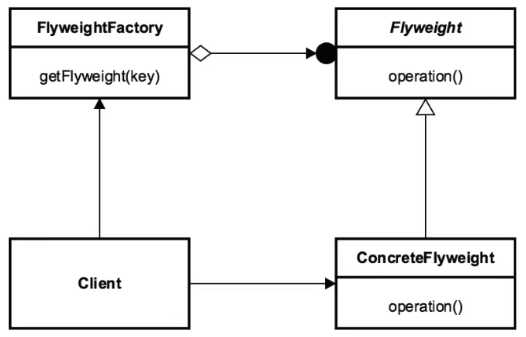
공통 속성은 공유하고, 변하는 값만 외부에서 주입하여 메모리 절약하는 패턴
많은 수의 유사한 객체들을 효율적으로 공유해 메모리 사용량을 줄이는 패턴
핵심은 공통된 속성(불변 값)을 공유하고, 변하는 속성만 외부에서 관리하는 구조
ex)
| 📊 수많은 객체가 생성될 때 | 예: 수천 개의 글자, 타일, 아이콘 등 |
| ♻️ 공통 데이터를 재사용할 수 있을 때 | 불변 속성이라면 객체 공유 가능 |
| 💾 메모리 최적화가 중요한 상황 | 게임, 렌더링 엔진, 대용량 데이터 처리 |
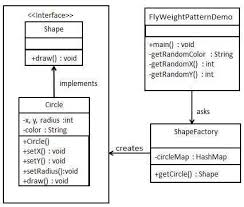
//Flyweight 객체
interface Shape {
    void draw(String color); // extrinsic 상태
}
//ConcreteFlyweight (공통 속성 저장)
public class Circle implements Shape {
private String color;
private int x;
private int y;
private int radius;
public Circle(String color) {
this.color = color;
}
public void setColor(String color) {
this.color = color;
}
public void setX(int x) {
this.x = x;
}
public void setY(int y) {
this.y = y;
}
public void setRadius(int radius) {
this.radius = radius;
}
@Override
public void draw() {
System.out.println("Circle [color=" + color + ", x=" + x + ", y=" + y + ", radius=" + radius + "]");
}
}//Factory (공유 객체 관리)
class ShapeFactory {
private static final Map<String, Shape> circleMap = new HashMap<>();
public static Shape getCircle() {
Circle circle = (Circle)circleMap.get(color);
if(circle == null) {
circle = new Circle(color);
circleMap.put(color,circle);
System.out.println("=== 새로운 객체 생성 : " + color + "색 원 ====");
}
return circle;
}
}public class Main {
public static void main(String[] args) {
String[] colors = {"Red","Green","Blue","Yellow"};
for (int i = 0; i < 10; i++) {
Circle circle = (Circle)ShapeFactory.getCircle(colors[(int) (Math.random()*4)]);
circle.setX((int) (Math.random()*100));
circle.setY((int) (Math.random()*4));
circle.setRadius((int) (Math.random()*10));
circle.draw();
}
}
}
==== 새로운 객체 생성 : Yellow색 원 ====
Circle [color=Yellow, x=76, y=2, radius=4]
Circle [color=Yellow, x=19, y=2, radius=8]
==== 새로운 객체 생성 : Red색 원 ====
Circle [color=Red, x=38, y=2, radius=2]
Circle [color=Red, x=41, y=0, radius=1]
Circle [color=Yellow, x=58, y=3, radius=2]
Circle [color=Yellow, x=31, y=0, radius=6]
==== 새로운 객체 생성 : Blue색 원 ====
Circle [color=Blue, x=7, y=3, radius=7]
Circle [color=Blue, x=84, y=2, radius=1]
Circle [color=Yellow, x=90, y=2, radius=2]
==== 새로운 객체 생성 : Green색 원 ====
Circle [color=Green, x=34, y=0, radius=2]